

CallFlow
Live on Google PlayFast, Local-First Call Workflow Assistant & Mini CRM for Android
Never Forget a Client Commitment Again.
CallFlow is a fast, local-first call workflow assistant and mini CRM for busy business owners, sales professionals, contractors, and freelancers. Capture notes, record voice memos, set callback alarms, or share catalogs and payment details on WhatsApp in seconds.
Experience CallFlow's High-Speed Workflow
See how the post-call action bar, voice memos, 1-tap WhatsApp sharing, and loud alarms connect everyday calls into closed business deals.
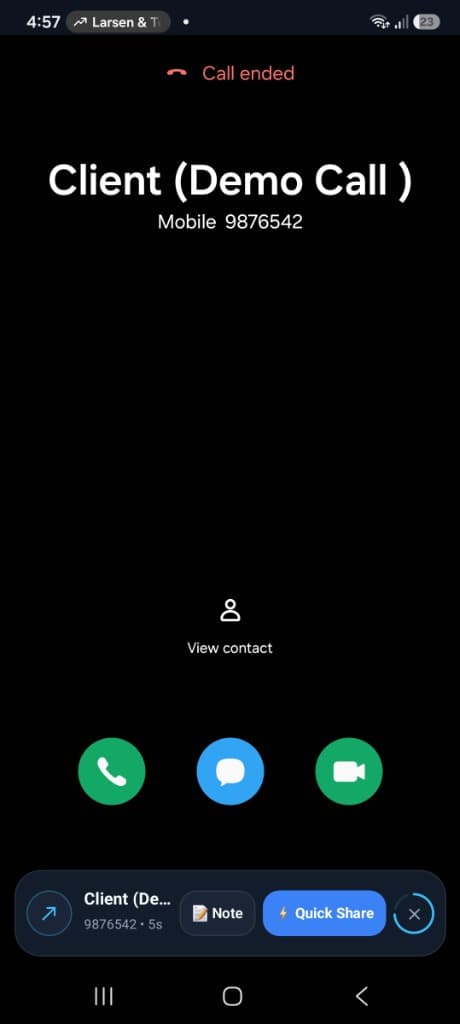
A Floating Card Right After Calls
Log notes, voice memos, checklists, or alarms without opening bulky apps.
The moment your phone call disconnects, a sleek, non-intrusive action card appears over your screen. Capture everything agreed upon during the call in under 3 seconds flat, right within natural thumb's reach.
Everything You Need, Exactly When Calls End
Engineered from the ground up for speed, offline reliability, and zero cognitive friction.
Post-Call Action Bar
A floating card appears right after calls to log notes, voice memos, checklists, or alarms without opening the app.
Voice Memos & Waveforms
Record quick audio notes right after calls with waveform visuals and variable playback speeds (1x, 1.5x, 2x).
1-Tap Quick Share & Forms
Send saved templates, addresses, catalogs, UPI QR codes, or fillable mini forms via WhatsApp or SMS in seconds.
Smart Input Assist in Chat
When typing in WhatsApp or SMS, a floating pill pastes templates or expands shortcuts like #address or #upi.
Deal Tags & Checklists
Organize contacts with tags like Hot Lead, Pending Payment, or VIP Client, and track checklist tasks directly on the caller record.
Search, Sort & Filter
Search contacts and notes. Filter timelines by voice memos, checklists, reminders, or deal tags like Payment Due.
Accurate Reminders
Set callback and payment alarms that ring reliably on schedule, even when your phone is locked or silent.
Timeline & CSV Export
View offline client history, export notes to CSV or text, and sync with optional encrypted Google backup.
Trusted by Daily High-Volume Callers
Retailers, wholesalers, sales agents, contractors, and consultants use CallFlow daily to log client commitments, record voice memos, share quotes, and track pending payments right after phone calls.
Retailers & Wholesalers
Instant Catalogs & Payment QR DispatchLog client commitments right after hanging up. Dispatch your shop address, UPI QR codes, or PDF catalogs on WhatsApp in seconds without saving contacts.
Sales Professionals & Agents
Organize Hot Leads & Rapid CallbacksOrganize contacts with tags like Hot Lead or VIP Client. Record hands-free voice memos on the go and set exact callback alarms that never get missed.
Contractors & Service Providers
Estimates, Advance & Job ChecklistsKeep site measurements, estimate requests, and advance payment verification attached to the client timeline with actionable checklists.
Consultants & Freelancers
Fast Voice Memo Review & CSV ExportReview client call instructions with 1.5x playback speed. Filter by deal tags and export complete meeting and note histories to CSV for billing.
How CallFlow Protects Your Privacy
Detects when a call ends to display the note card promptly. We never record phone calls.
Used strictly when you choose to record a personal voice memo note. We never record phone calls.
Resolves caller names and numbers to organize client timelines on device.
Displays the compact action bar and in-chat pill over other apps.
Ensures callback and payment reminders ring reliably on time.
Powers Smart Input Assist to display the 1-tap snippet paste pill over chat apps. Zero keystroke logging.
Available Now on Android. iOS Coming Soon.
CallFlow is officially published on Google Play. Install it now to turn everyday phone calls into closed deals and instant actions.
Frequently Asked Questions
Everything you need to know about CallFlow, your privacy, and device permissions.
Does CallFlow record my phone calls?
No, absolutely not. CallFlow does not record or listen to phone calls. Voice memos in CallFlow are strictly personal audio notes recorded by you after the call has concluded.
How does Smart Input Assist work inside chat apps?
CallFlow uses an optional Android Accessibility Service to detect when you focus on a text input field in WhatsApp or SMS. It displays a floating 1-tap pill and expands shortcuts like #address or #upi. It operates 100% on-device with zero keystroke logging.
Do I need to save a customer's phone number to send WhatsApp templates?
No. CallFlow automatically detects the caller's phone number and allows you to dispatch your shop address, catalog, or UPI QR code to WhatsApp with a single tap without saving the contact to your phonebook.
Where is my client data, voice memos, and notes stored?
100% on your device. Notes, voice memos, and checklists stay securely in your phone's local storage. Cloud backup via Google Sign-In is completely optional and encrypted.
Can I export my notes and client history?
Yes. You can export client timelines, call notes, and checklists directly into clean CSV spreadsheets or text format with a single tap anytime.
CallFlow Android Legal & Compliance Hub
Google Play Store compliant policies, device permissions transparency, and data control.